Executive Summary
Most AI tool purchases fail because the decision is made before anyone asks the right questions.
When there is pressure to move quickly on AI, it's easy to adopt something quickly without the proper due diligence
The most important questions about workflows, auditability, data, and what happens when the tool gets things wrong.
This article distills the conversation I had with Paul Barnhurst, The FP&A Guy on The Diary of a CFO into practical questions you can use before your next AI purchase. Paul has tested many of the major FP&A tools in the market and has trained thousands of finance professionals on how to select and implement them well.
You can listen to the full episode here: Excel vs FP&A Software: When to Make the Switch.
Why questions come first
We have seen this before. A demo looks impressive. The team feels behind the market. Leadership wants a visible win.
The purchase happens before anyone has asked the questions that determine whether the tool will work in daily operations.
Then reality hits.
The tool cannot be used consistently across the team.
Outputs are hard to review or verify.
Data access raises risks that nobody fully discussed when the contract was signed.
Integration needs workarounds that quietly kill adoption.
Six months later, the tool is still in “pilot,” the business case is fuzzy, and no one wants to own the outcome.
This is not an AI problem. It is a problem with how we choose and implement tools.
In our episode, Paul described how he has seen these patterns repeat across FP&A and AI tools and why finance leaders need a more structured way to decide when to buy, how to select, and what to expect from implementation.
One rule that simplifies everything
Refuse to buy tools for capability. Buy tools for workflows.
A workflow is specific. It has:
A clear starting point
A clear ending point
A named owner
A measurable output
In finance, strong early candidates include:
Drafting variance commentary
Close exception triage
Invoice dispute categorization
Drafting internal policy documents
Building standard analysis packs for recurring meetings
Targeted automation in these areas works because the scope is narrow enough to measure, own, and adjust.
If a vendor cannot map their product to a specific workflow with a named owner and a clear output, you are evaluating a general capability, not a solution. That is where many failed AI and FP&A purchases begin.
How to use this article
You can use this article in three ways:
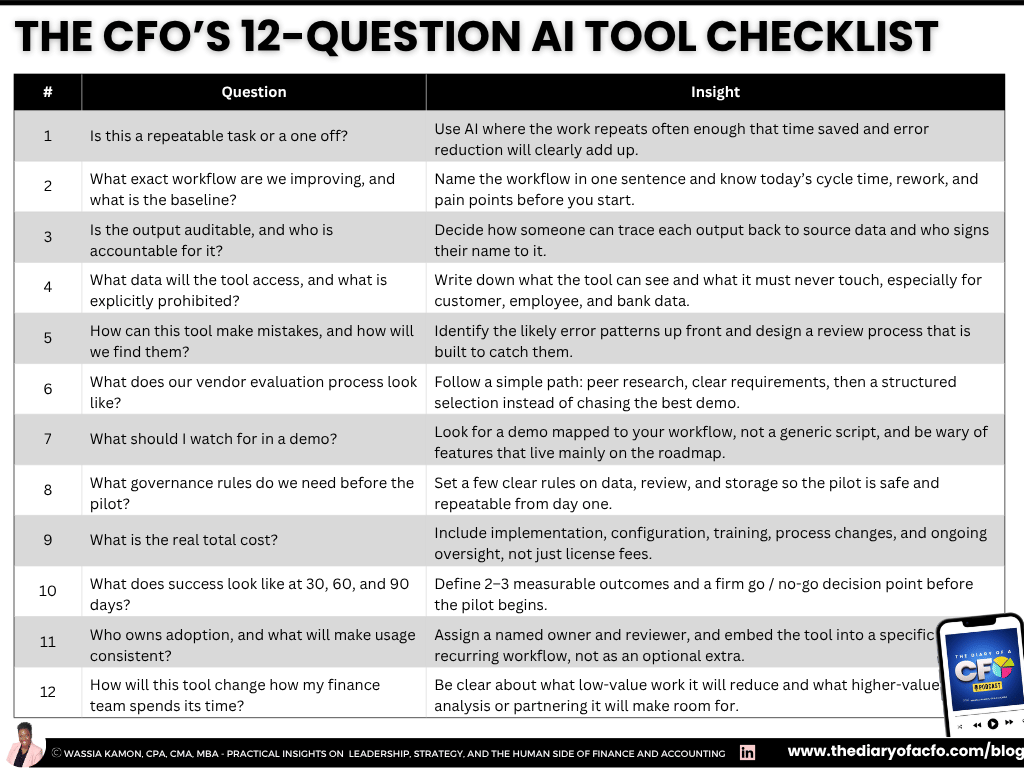
As a checklist when you evaluate your next AI or FP&A tool
As input into your AI governance and procurement process
As shared reading with your CIO, CTO, or FP&A lead before you enter a sales cycle
The questions below build directly on the frameworks Paul shared in our conversation about when to move off Excel and how to avoid regretful software decisions. You can find those in the full episode and recap on The Diary of a CFO website.
1. Is this a repeatable task or a one off?
This is Paul’s first filter and one that many evaluations skip.
Before you ask which AI tool to buy, ask what type of AI is appropriate for the task.
That starts with understanding the difference between deterministic and generative AI.
Deterministic tools always return the same answer for the same input.
Examples include:
Power Query automations
Rules based categorization engines
Machine learning models that classify transactions in a consistent way
You test them, confirm they work, and then rely on them with limited review.
Generative AI is different. It uses probabilities to create outputs.
The same input can produce different results at different times depending on prompts, settings, and model behavior. You cannot treat generative AI the way you treat a formula in Excel. A formula will not change its answer unless the inputs change. Generative AI can.
Examples of deterministic vs. generative AI use cases
If the task needs the same answer every time, such as reconciliations, data transformations, or standard categorization at scale, a deterministic solution is usually a better fit. That's why a good deterministic use is standardizing expense categories from multiple sources into your chart of accounts.
On the other hand, if the task involves drafting, summarizing, or creating content where some variation is acceptable, generative AI can be very helpful. That's why a good generative use would be drafting first pass variance commentary for your top 20 P&L lines each month.
Knowing which type of AI you need before the demo saves time and prevents expensive mismatches.
2. What exact workflow are we improving, and what is the baseline?
In Paul’s framework, you start by mapping your pain points, ranking them, and then asking where tools actually help.
You should be able to describe the workflow in one sentence and quantify what it looks like today.
For example:
“Drafting monthly variance commentary for board materials takes 40 hours across four people each month and often leads to last minute rework the night before the meeting.”
For each workflow, define:
How long it takes
How many people touch it
How often it creates rework or delays
Where the pain shows up
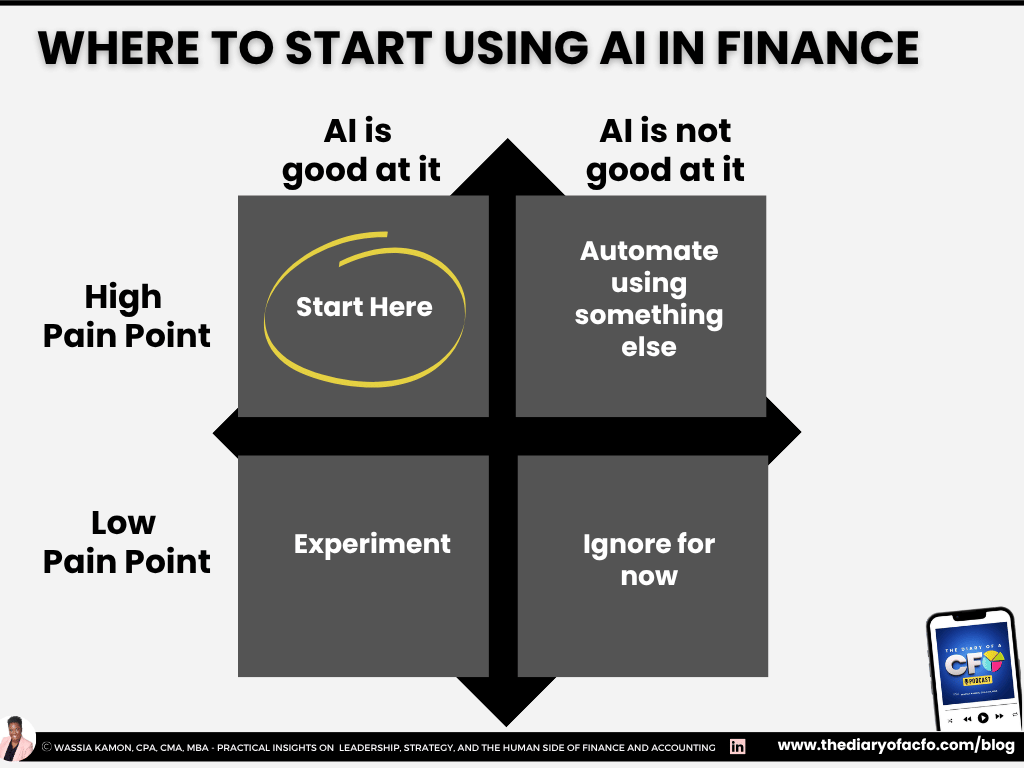
Ideal starting points are workflows that are both:
High pain
High fit for AI or automation
Low pain workflows can be useful for experimentation, but they should not be the foundation of your business case.
If you cannot measure the baseline before the pilot, you cannot measure improvement afterward.
3. Is the output auditable, and who is accountable for it?
Finance runs on auditability. Any output that touches decisions, reports, or external communication needs to be:
Traceable
Verifiable
Owned by a specific person
AI tools introduce a specific risk. The output can look polished and sound confident while still containing:
Faulty logic
Overly general language that hides important detail
Figures that cannot be tied to a source
The tool does not flag these issues. The reviewer does.
Before any pilot, answer:
Can a finance team member review the output in a reasonable amount of time?
Can the reviewer learn where the tool tends to go wrong without deep technical training?
Who is accountable when a reviewed output still contains an error?
That last question is the one most evaluations skip. It is also the one that determines whether your process will hold up in an audit.
4. What data will the tool access, and what is explicitly prohibited?
Vague data conversations during evaluation become painful risk conversations after the contract is signed.
Before you sign anything, write down:
What the tool will access
What the tool will never access
Identify whether the workflow touches:
Sensitive employee data
Customer data
Bank details
Contract terms
Information with regulatory requirements
Then ask the vendor to explain, in plain language:
How data is ingested
How it is processed
How it is stored
How and when it is deleted
Whether your inputs are used to train their models
What happens to your data if you cancel
How they respond to a data incident
If the vendor cannot answer clearly, the data risk is not resolved. That is a reason to pause the process until it is.
5. How can this tool make mistakes, and how will we find them?
This is the question most evaluations skip entirely and the one that causes the most problems after procurement.
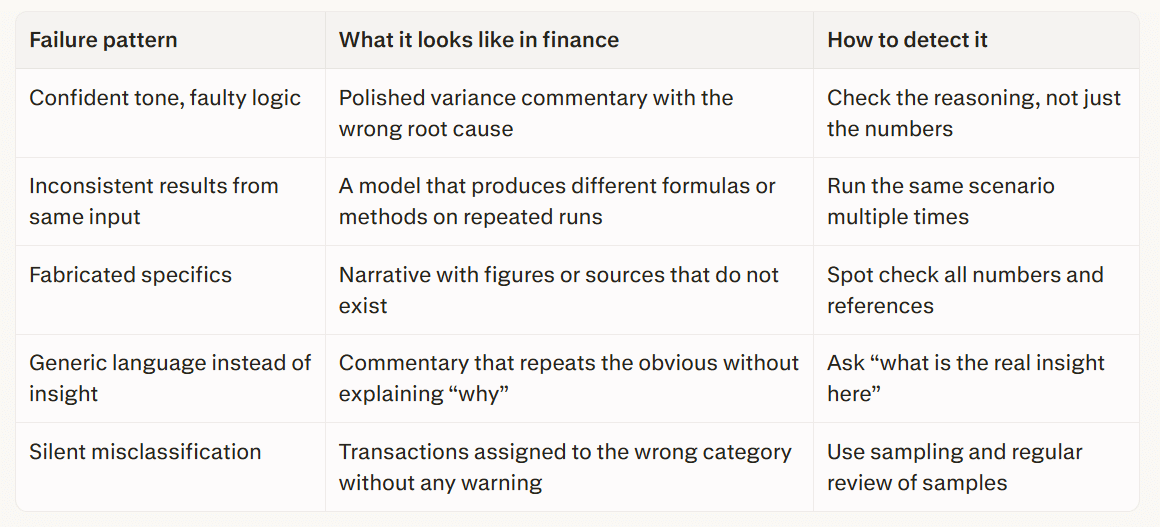
Every AI tool makes predictable, recurring mistakes. These are not random crashes or obvious errors. They are the specific ways the tool gets things wrong by design, and they can look like finished work if you are not watching for them.
In finance, the most common ones are worth understanding before you run a pilot:
- Confident tone, faulty logic
As I like to say,
AI can make something really bad look very good.
Outputs that read as authoritative but contain incorrect assumptions.
This is the hardest to catch because it does not look like a failure. It looks like a polished, ready-to-share document.
- Inconsistent results from the same input
As Paul's team found when testing AI modeling tools, the same task run twice can produce significantly different results, sometimes with entirely different formulas used to reach the same answer. In variance commentary this may not matter. In a model relied on for a capital decision, it does.
- Fabricated specifics
Figures or citations in narrative copy that do not exist. In internal analysis this is embarrassing and correctable. In anything approaching external reporting it carries material risk.
- Generic language in place of insight
The tool produces commentary where analysis is needed. It passes the format bar while missing the substance bar entirely.
- Silent misclassification
In categorization workflows, the model applies the wrong category with no indication of uncertainty. Without a sampling and review cadence, errors accumulate across a high volume of transactions before anyone notices the pattern.
Ask the vendor:
Which patterns apply to their tool
How they suggest you mitigate them
Then build your review process around those patterns before the pilot starts.
6. What does our vendor evaluation process look like?
Paul recommends a three phase approach for tool selection, which applies to both FP&A and AI tools.
Research
Talk to peers who have implemented similar tools.
Use CFO and finance communities to ask what has worked and what has failed.
Use market maps and independent reviews to narrow to a realistic shortlist.
Structured selection
Write your requirements before deep demos.
Run a simple RFP so you evaluate tools against your needs and not just against each other’s best features.
Implementation readiness
Check if your data is clean enough for the tool to work.
Document workflows and requirements clearly.
Protect someone’s time to own the project rather than asking them to “fit it in” around a full time role.
The tool matters. Implementation readiness matters more.
7. What should I watch for in a demo?
Paul sees the same signals come up again and again when finance leaders evaluate tools.
Be cautious when:
The vendor cannot map their demo to your industry, company size, or specific workflow.
The conversation relies heavily on “roadmap” features instead of what exists today.
Claims of uniqueness are not backed up by clear examples or honest discussion of competitors.
Positive signs include:
The vendor has done their homework on your business.
They can show a workflow that looks like yours.
They can explain where the tool is strong and where it is not.
One request that vendors are not always ready for:
“Show me a bad output from your tool and how a reviewer would catch it.”
A vendor who answers that clearly has thought seriously about quality.
8. What governance rules do we need before the pilot?
You do not need a full AI policy to start a pilot. You do need a short set of rules that make the workflow safe and repeatable.
At a minimum, define:
What data is in scope and what is out of scope
Who is accountable for reviewing outputs
What review steps are required before anything is shared
Where outputs can be stored and for how long
Governance should feel like a clear checklist that teams can follow, not a blocker that prevents them from opening the tool.
9. What is the real total cost?
License fees are only the visible part of the cost. The real total includes:
Implementation and configuration
Standardizing prompts, templates, and workflows
Training and onboarding time
Ongoing monitoring and review
IT and security involvement
Process redesign so outputs are actually used
Paul’s point here is straightforward. If you are making a meaningful annual investment in a tool, you need to protect enough of someone’s time to implement and maintain it. Splitting implementation across already full workloads is one of the most common reasons projects fail.
If a vendor ROI model assumes there is no change management required, that model is not realistic.
10. What does success look like at 30, 60, and 90 days?
Define what “good” looks like before the pilot starts. For example:
Time saved per cycle
Reduction in rework
Fewer last minute errors
Faster movement from analysis to decision
Paul recommends starting with something low risk and relatively simple so teams can get comfortable before expanding scope. Early wins build trust and make it easier to extend the tool into more important workflows.
Set a clear go or no go decision at the end of the pilot and decide the criteria in advance.
11. Who owns adoption, and what will make usage consistent?
Tools that are optional usually become tools that are unused.
Name:
An operational owner who manages daily use
A reviewer who is accountable for quality
A regular cadence for checking usage and performance
Integrate the tool into existing routines where possible. For example, make AI drafted variance commentary the starting point for every monthly review meeting, with reviewers required to edit and sign off.
Ownership is what closes the gap between a signed contract and a tool that is actually used.
12. How will this tool change how my finance team spends its time?
This question brings everything back to the real goal. AI tools are not only about speed or cost. They are about how your team’s time is used.
Ask yourself and your team:
If this tool works as promised, what will we stop doing, start doing, or do differently?
Will we free up time for higher quality analysis, better business partnering, or deeper scenario work?
Or will we simply use the time to push more volume through the same low value work?
If you cannot describe how the tool will change the shape of work for your team, you may not have a strong enough reason to buy it yet.
Buy, build, or wait
After working through these questions, the decision is often clearer.
Buy when the workflow is defined, outputs are auditable, governance is in place, the vendor can answer tough questions, and the tool integrates without a permanent workaround.
Build when the workflow is truly proprietary, you have internal capability, and the business case is strong enough to justify ongoing maintenance. This is less common than it sounds.
Wait when the use case is vague, data risk is unresolved, the vendor cannot explain how the tool fails, or adoption depends on the team running manual workarounds forever.
And don't feel bad about waiting. It is a disciplined choice when the cost of a wrong decision is higher than the cost of delay.
Three actions before your next AI tool purchase
Write the workflow in one sentence and measure the baseline.
Define minimum governance and data rules and name a review owner.
Design a 30 day pilot with two measurable success metrics and a firm go or no go decision.
The CFOs who get the most from AI are not the ones who moved first. They are the ones who asked better questions before they bought anything.
FAQ
What is the single most important question to ask before buying an AI tool?
The most important question is whether you can name a specific workflow the tool will improve and measure the baseline today. A workflow without a baseline is a guess. A baseline without a workflow is just a number. Together they define whether the tool has a real job to do. This reflects the workflow first approach that Paul and I discussed.
How is evaluating an AI tool different from evaluating other finance software?
There are two key differences. First, AI outputs can sound correct while being wrong. A traditional software error is usually obvious. An AI tool can produce a polished, confident output that contains a faulty assumption or a figure that does not exist. Second, not all AI works the same way. Deterministic tools return the same answer from the same input every time, while generative AI can return different outputs from identical inputs. Understanding which type you are dealing with changes how you design your review process.
What should I ask a vendor in a demo that they are not expecting?
Ask them to show you a bad output. Ask them to walk you through the most common ways their tool gets things wrong and how a reviewer would catch it. Then ask whether the features you need are in the product today or mainly on the roadmap. A vendor who can answer the first two questions clearly has thought seriously about quality.
How do I know if our team is actually reviewing outputs or just approving them?
Ask how long a typical review takes and what the reviewer is specifically looking for. If the answer is vague, the review is likely a formality instead of a real check. A credible process names the types of errors reviewers are watching for and explains how they verify that the output is correct, not just that it looks finished.
When should a CFO wait instead of buying?
You should wait when the use case cannot be named as a specific workflow, the data risk is unresolved, the vendor relies heavily on roadmap promises, or the tool requires the finance team to maintain a parallel process that is not sustainable. Waiting is discipline, not indecision, when the cost of a wrong decision is higher than the cost of delay.
How do I stop an AI tool from becoming something nobody uses after six months?
Assign a named owner, embed the tool into a specific daily workflow, standardize templates and review steps, and track usage on a regular cadence. The most common reason tools go unused is that they sit next to existing workflows instead of being built into them.